WiFi X-Ray names every device on your network, grades your security A to F, and hands you the exact steps to fix what is wrong — matched to your router brand where it can identify it.
There are about twelve things on your home network right now. You can probably name four. The rest are quietly making decisions about your privacy.
Your router is a computer
It runs services, opens ports, and ships with defaults nobody revisits. It is also the one device every other device trusts.
Randomized MACs broke vendor lookup
The old trick of naming a device by its MAC prefix now returns nothing on most modern hardware. Something else has to do the naming.
Data is not a verdict
Plenty of tools will show you a wall of numbers. Very few will tell you which one matters this evening, and what to press.
How it works
Three screens between you and knowing.
No configuration, no agent to install on anything else, no account to create. Open it and press scan.
01
Find everything on it
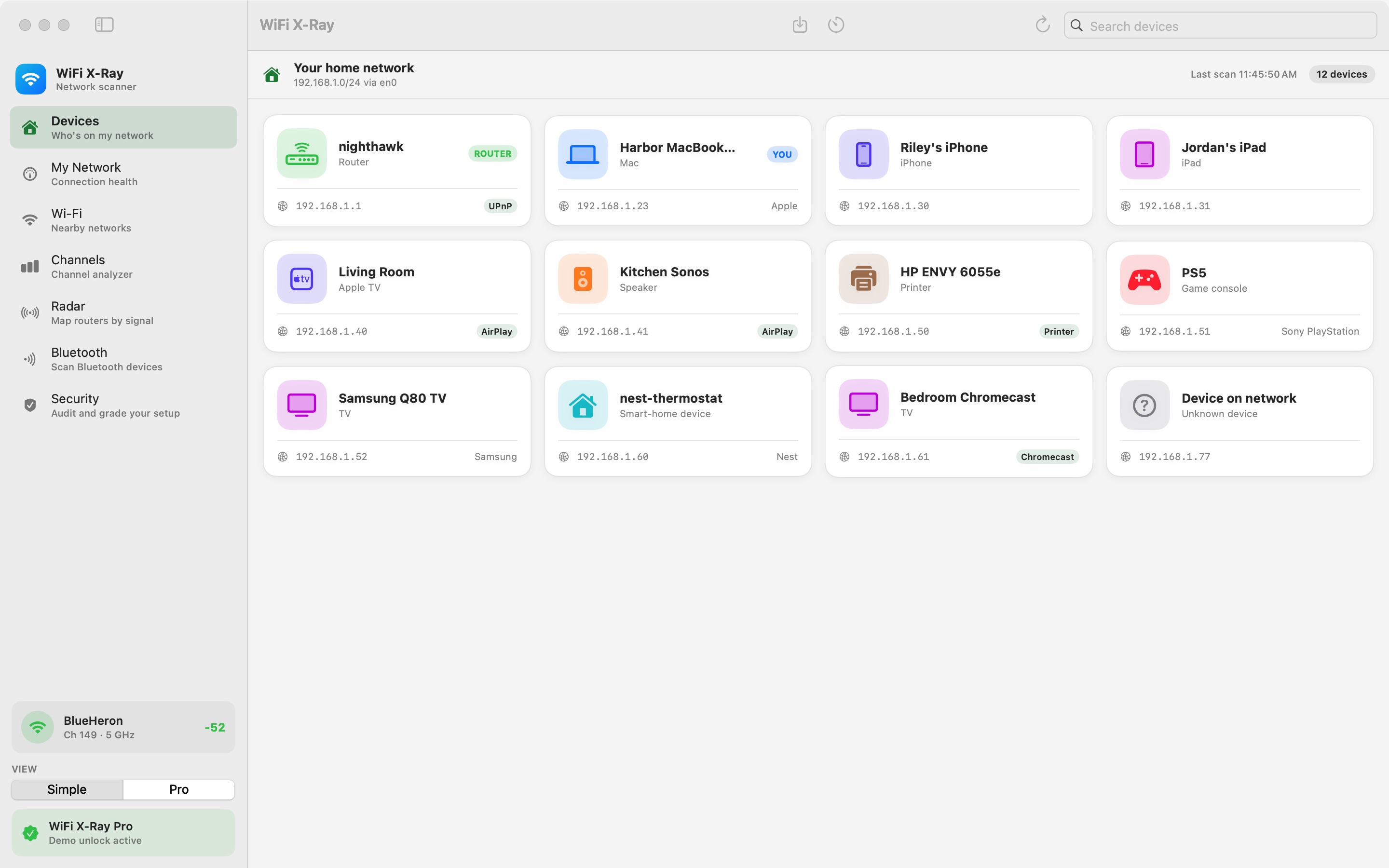
About thirty seconds after you press scan, every device on the network is listed by name — phones, TVs, speakers, printers, consoles, smart-home gear. Bonjour names and open-port fingerprints do the identifying, so it still works when a randomized MAC address gives up nothing.
02
Get a verdict, not a dump
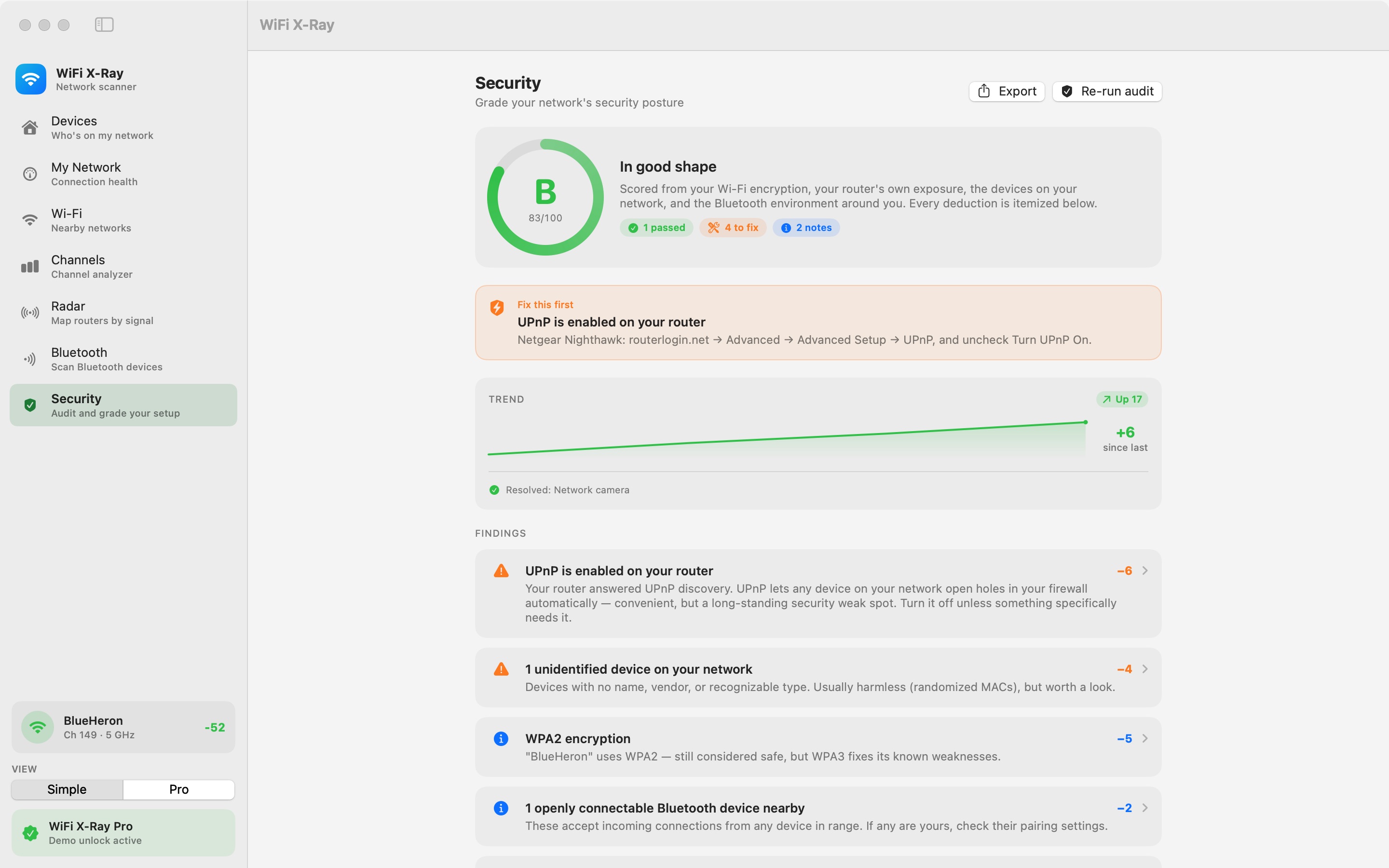
One tap grades Wi-Fi encryption, your router's own exposure, unidentified devices, and the Bluetooth around you. You get a letter and a score out of 100, and every point you lost is itemized in plain language.
03
Fix it, then watch it hold
Each finding opens into steps you can actually follow, using your router brand's own admin address and menu names when it recognizes one. Re-run the audit and the trend line moves. The menu bar monitor keeps an eye on it after that.
What it does
Most network tools show you data. This one gives you a verdict.
A to F security audit
One tap grades encryption, router exposure, unidentified devices, and Bluetooth into a single letter with a score out of 100. Every deduction is explained, ranked, and paired with what to do about it.
Free
Devices, named in English
Bonjour names plus port fingerprinting plus a sticky identity cache. It names what MAC lookup alone cannot.
5 free · all with Pro
Router-aware fixes
When it recognizes the brand it gives that brand's admin address and menu path — Netgear, ASUS, TP-Link, eero, and major ISP gateways. When it cannot, it gives clean generic steps instead of guessing.
Free
Channel analyzer
See exactly how crowded every channel is around you, then get a recommendation for the one to switch to. 2.4 GHz is free; Pro adds 5 and 6 GHz.
5 & 6 GHz with Pro
Radar & live signal
Map the access points around you by signal strength and watch your own connection move in real time.
Free
Bluetooth exposure
Find the devices around you accepting connections from anything in range, including the ones you forgot are yours.
Free
Reports & export
Devices and networks out as CSV or JSON, and the whole audit as a readable security report you can hand to someone.
Pro
Simple by default. Pro when you want the columns.
Flip one switch and the friendly cards become a sortable table with BSSID, SNR, noise, open ports, latency, jitter, and packet loss. Same app, same scan, more surface area.
Pro view
B83 / 100
In good shape
The numbers that matter
A grade you can act on.
The score is computed from real observations on your own network — never from a database of averages, and never from anything sent off the machine.
100%of every scan, probe, and grade computed on your MacLocal
0accounts, trackers, analytics, or telemetry endpointsCloud
$14.99one time for Pro — there is no subscription to cancelPrice
30field guides in the research library, free to readLibrary
Built like a Mac app, not a dashboard.
01 / 05 — scroll
WelcomeStraight to work. Nothing to sign up for.
DevicesTwelve things, twelve names.
SecurityOne grade, every deduction itemized.
My NetworkConnection health at a glance.
Pro viewThe full table, when you want detail.
Comparison
How it differs from the tools you already know
Plenty of Mac apps will show you networks. The gap has always been what to do next.
Capability
WiFi X-Ray
Typical Wi-Fi analyzer
Typical LAN scanner
Nearby network scanning
Yes
Yes
No
Device discovery on your LAN
Yes
No
Yes
Identifies devices behind randomized MACs
Often, via Bonjour and port fingerprinting
No
Rarely
A to F security grade
Yes
No
No
Checks the router's own exposure
Yes
No
No
Router-brand-specific fix steps
Yes
No
No
Bluetooth exposure analysis
Yes
No
No
Pricing model
One-time $14.99
Often $20 to $100+
Often subscription
Comparison describes common patterns in the category rather than any single named competitor at a point in time.
Privacy
Nothing leaves your Mac.
No account. No cloud service. No telemetry, analytics, or ads. Every scan, probe, and grade is computed locally and stays on the machine that ran it — which is also why the app can be honest about what it cannot see.
No sign-upNo telemetryApp SandboxRead-only — it never changes a settingNot an intrusion detector, and never says it is
Pricing
Free to use. $14.99 once, if you want more.
No subscription, no tiers to decode, no upsell on every screen.
Free
$0forever
The whole point of the app, unpaid.
Full A to F security audit with router-aware fixes
No. Every scan, probe, and grade runs locally on your Mac. There is no account, no cloud service, and no telemetry. Nothing about your network leaves the machine.
Can it detect a hacker on my network?
No, and it does not claim to. WiFi X-Ray grades your security posture from real observations — encryption mode, router exposure, unidentified devices, Bluetooth. It is not an intrusion detection system and it is not an antivirus, and an app that promises either on a home network is overselling.
How does it name a device with a randomized MAC address?
It combines Bonjour and mDNS service names with open-port fingerprinting and a sticky local identity cache. That is why an Apple TV or a printer usually gets a real name even when vendor lookup by MAC address returns nothing at all.
Will it change anything on my router?
Never. WiFi X-Ray only observes — it reads what your network already broadcasts. Every change it recommends is one you make yourself, in your own router's admin page, with the steps written out.
Which Macs does it support?
macOS 14 Sonoma or later, running natively on both Apple Silicon and Intel.
What exactly do I get for $14.99?
A one-time unlock — no device limit, deep and per-device port scanning, 5 and 6 GHz channel analysis, the Pro tables, latency and speed diagnostics, CSV and JSON export, the shareable security report, and new-device alerts. The full A to F audit and the core scanning stay free whether you buy it or not.
Coming soon
WiFi X-Ray is finishing Mac App Store review.
Leave your email and we'll send exactly one message, the day it's live. No account, no list, no spam — the same local-only rule the app itself follows.